Google trends is great resource to check the latest search trend on Google. It includes online search trends across the world on various topics and a historical trend can be obtained from many years ago. If you are interested in knowing how the trend is for a famous celebrity or your favorite city use Google trends to see how people are searching. You can also embed Google Trends into your website to present users the relevant search trends for a specific topic. Note that Google trends doesn’t show you the exact search volume but instead gives you a trend/line graph that gives you a high level view of search trends. A great case to use Google ends is in corporate presentations, websites and blogs. Online marketers can use this tool to research consumer preferences and there are numerous other use cases for Google trends. Embed Google Trends In your website by following these simple steps outlined below.
How to Embed Google Trends Into Your Website
1. Go to the Google Trends website. Google presents some of the hottest search trends right now. They give you a sample of what people are searching for and typically includes keywords from current events around the world.

Google Trends
2. We will search for two keywords. Dogs and Cats and see how the search trends compare for the two keywords. Enter the keywords you wish to choose. It can also be a single keyword. Enter keyword(s) and click Explore.

Google Trends Search
3. A search trend graph will be displayed with two distinct colors (dogs = blue; cats – red) to differentiate the keywords. Note that this is not the exact search volume, but a relative estimate of search volume.
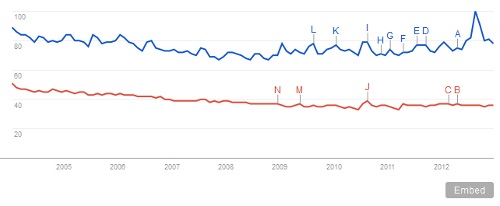
Embed Google Trends Search Graph
4. To embed this particular Google Trends into your website, click on the Embed button  below the graph. An overlay will appear that contains the JavaScript. An example of the Google Trends embed code has been included below to show how the embedded Google Trends graph will look like.
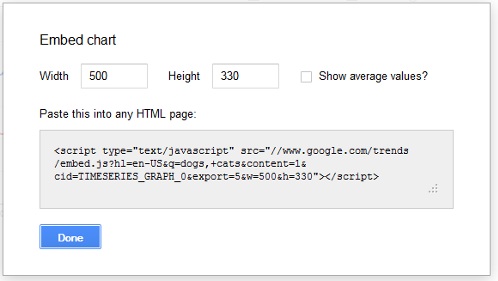
Embed Google Trends into Your Website
Sample Google Trends Embed (Dogs vs Cats)
Embed Google Trends Into Your Site
Google Trends Search Volume
Do you use Google Trends a lot to check search volume for certain phrases? Consider using Google Trends for many different use cases including online marketing, research, corporate presentations
Related Terms:
- google trends embed
- embed google trends
You may also like to read:
- How to Embed Google Maps in Website
- How to Add Customizable Google Plus Widget to Your Website
- How to Add Twitter Profile Widget to Your Website or Blog
- How to Add Google Translate Widget to Your Website?